Agent Monitoring Tool Finally Exists
When running 3 AI Agents simultaneously, you have no idea which one is burning through your budget. Since the launch of Claude Code and Codex CLI, many users have been running multiple Agents concurrently—one writing frontend code, another modifying backend logic, and a third running tests. But a problem soon emerges: how many Tokens has each session already consumed? Is the context window nearly full? How much rate limit quota remains? For such critical information, you have to manually switch back to each session to check.
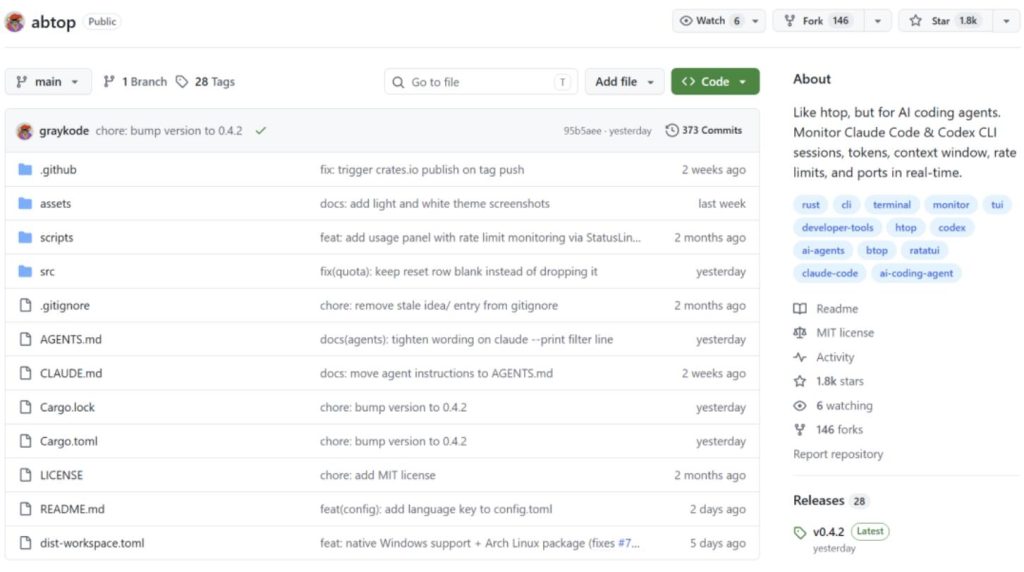
Recently, I came across a project on GitHub that solves this problem. It’s called abtop, and it already has 1,800 stars on GitHub. Essentially, it’s a terminal tool for monitoring locally running AI programming Agents. Just as you used htop to view server processes, abtop lets you see the status of all Claude Code and Codex CLI sessions at a glance: how many Tokens consumed, remaining context window capacity, remaining rate limit quota, whether sub-processes are running, or if any ports were opened and forgotten. Information that previously required manual switching is now centralized in a single interface.
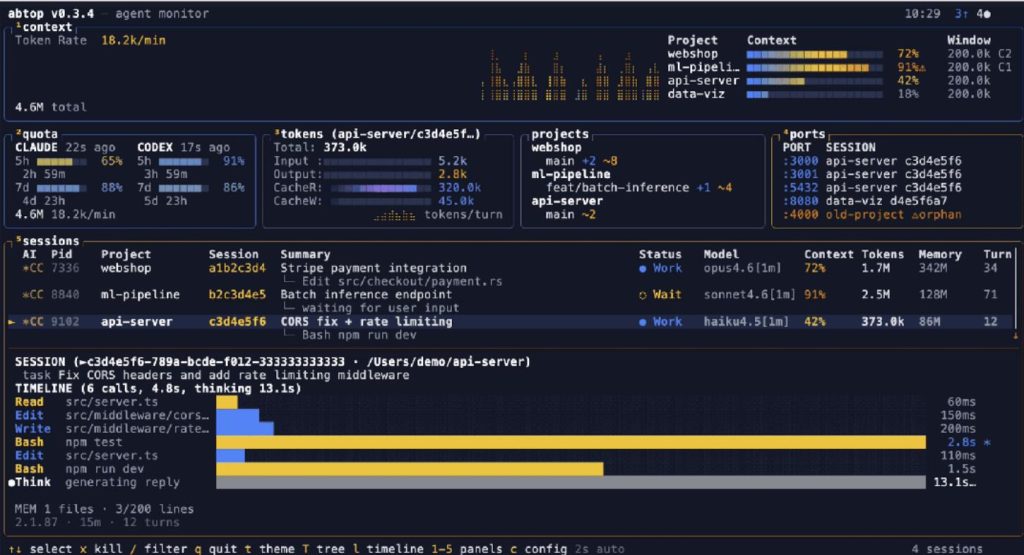
abtop real-time monitoring demo
What’s truly interesting is that it requires no API Key and no login authentication. abtop only reads local files and process statuses—all monitoring is done on your own machine. Tool names and file paths are displayed in the interface, but file contents and prompts are never exposed.
It provides you with key information for each AI Agent session:
01 Token Tracking
You can see in real-time how many Tokens each session consumes and the corresponding cost, without waiting for the billing cycle to check.
02 Context Window Monitoring
Real-time display of session context usage; it will alert you when it’s nearly full, allowing you to decide whether to start a new session and avoid task interruption due to a full window.
03 Rate Limit Monitoring
The interface also shows remaining API quotas and reset times, helping you plan tasks in advance to avoid interruptions from rate limits.
04 Orphaned Port Detection
Sometimes Agents open ports and forget to close them, leaving the ports occupied. abtop can detect these automatically and clean them up with one click—super convenient.
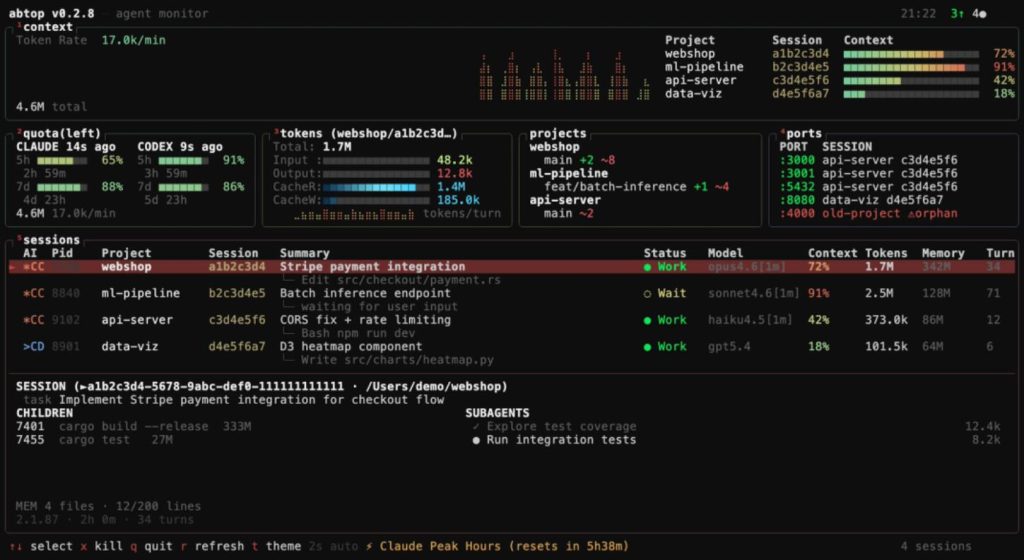
abtop default theme interface
In addition to core monitoring features, abtop has some thoughtful details. It runs natively on Windows without requiring WSL, which is rare among similar tools. Most terminal tools either only support macOS and Linux or require WSL on Windows. abtop directly uses sysinfoto retrieve process information and netstat -anoto get listening ports, sparing you the hassle of dealing with virtualization environments.
12 built-in themes, including 4 colorblind-friendly themes. This is truly a pleasant surprise—they’ve even considered high-contrast, red-green colorblind, and blue-blind adaptations, making the interface clear and accessible for colorblind users.
Theme showcase
Moreover, abtop offers 12 built-in themes, ranging from classic to modern styles:
- Classic Theme: The btop-style default theme uses classic blue-green colors, suitable for developers accustomed to traditional terminal interfaces. btop default theme
- Modern Themes are more diverse:
- The Dracula theme uses a purple color scheme, especially eye-catching in dark terminals. Dracula theme
- The Catppuccin theme adopts a soft, gentle color palette. Catppuccin theme
- The Tokyo Night theme is inspired by Tokyo’s nightscape, with a deep blue background and bright highlights—it’s quite atmospheric for nighttime use. Tokyo Night theme
- Gruvbox features a retro, warm-toned style that’s easy on the eyes even after long hours. Gruvbox theme
- Nord theme focuses on clean, cool tones. Nord theme
Additionally, the aforementioned colorblind-friendly themes are thoughtfully designed:
- The high-contrast theme remains clear even in poor lighting. High contrast theme
- The green-blind theme adjusts colors specifically for users with green color blindness. Green-blind theme
- Similarly, the blue-blind theme modifies the color scheme for blue-blind users. Blue-blind theme
If you prefer light backgrounds, there are two options:
- A Solarized-style theme with a creamy palette. Light theme
- A GitHub-style pure white theme, exceptionally clean. White theme
To switch themes, simply press the tkey. Your selection is automatically saved and restored the next time you open abtop.
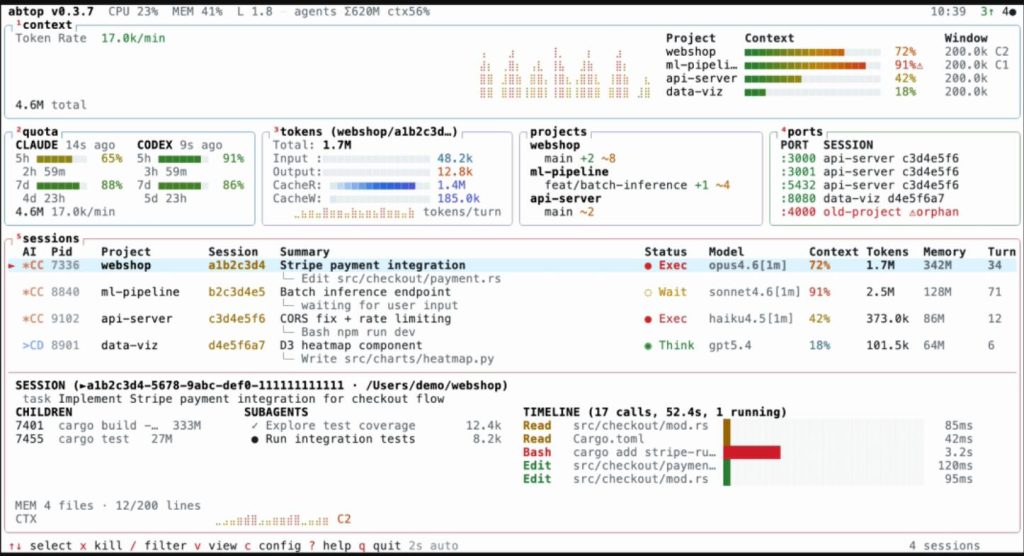
tmux Integration
When running abtop in tmux, pressing Enter directly jumps to the pane running that Agent. This saves a lot of manual switching for tmux users.
After seeing these features, I’m sure you’re eager to try it. macOS and Linux users can install it directly with curl:
bashbashcurl --proto '=https' --tlsv1.2 -LsSf https://github.com/graykode/abtop/releases/latest/download/abtop-installer.sh | sh
Windows users can install it with a single PowerShell command:
powershellpowershellpowershell -c "irm https://github.com/graykode/abtop/releases/latest/download/abtop-installer.ps1 | iex"
After installation, simply run abtopto start. Note: Make sure Claude Code or Codex CLI is running first, otherwise it won’t detect anything.
Now, a few limitations:
Currently, it only supports Claude Code and Codex CLI Agents. If you’re using Aider, Cursor, Gemini CLI, or Goose, it won’t work for now. Competitors like agtop support more Agent types but lack abtop’s theme system and Windows support. Additionally, abtop lacks historical data storage and analysis—it only shows real-time status. If you need to track long-term Token consumption, you might still need tools like ccusage.
But if you mainly use Claude Code and Codex CLI and often run multiple sessions simultaneously, abtop can indeed simplify monitoring. It requires no API Key, no complex configuration—just install and use.
Final Thoughts
As someone who frequently runs multiple AI Agents, I’ve found that abtop truly saves a lot of effort. Previously, checking Token usage or context window status required switching between sessions. Now, everything is visible in one interface. Plus, it requires no API Key, no login—just install and go. Highly recommended for anyone regularly running Claude Code and Codex CLI simultaneously.
The project is open-source under the MIT license. If you’re interested, check out the source code and documentation on GitHub.
GitHub Repository: