Anthropic Announces: Write in HTML
A few days ago, I saw an interesting post on X: Anthropic’s Claude Code team announced that their internal documentation is no longer written in Markdown, but directly in HTML. The reason: Markdown is for writers, HTML is for readers.
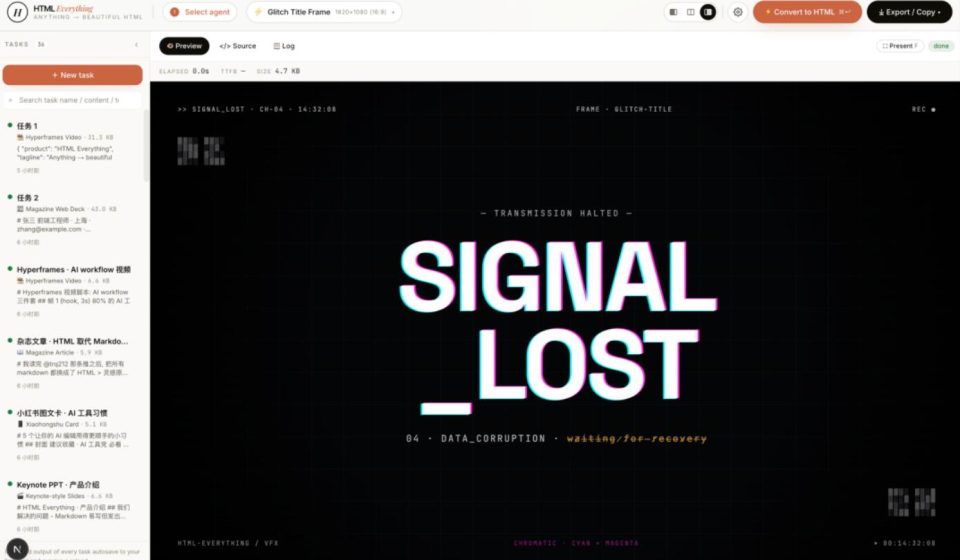
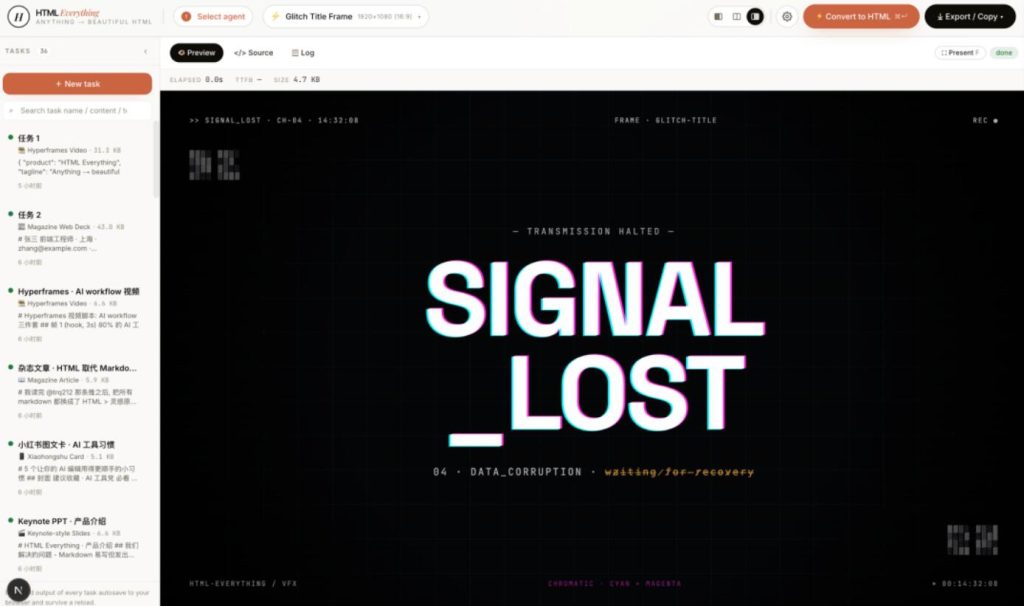
Shortly after, a project called html-anything went viral on GitHub—already gaining 2,500+ Stars. It enables your local AI Agent to write HTML for you. It doesn’t output Markdown or PPTX, but pure static HTML files. Input requirements on the left, choose a template in the middle, and preview the result in real-time on the right.
After installation, you only need to do one thing: describe what you need. For example: “Make a technical blog post, dark theme, with code examples and data charts.”
The AI automatically selects the template, applies design constraints, and outputs a complete HTML file. It’s a finished product, not a draft.
It doesn’t provide AI, it just orchestrates
Regarding implementation, html-anything doesn’t come with a model, nor does it sell API keys. Simply put, it calls the AI tools you already have installed on your computer. Claude Code, Cursor, Gemini CLI, Copilot… as long as you’ve used and logged into them before, it just uses them. No additional registration or payment required.
Every generated page is a finished product, not a work in progress
It comes with 75 carefully designed templates. Each template has strict constraints:
- CJK-first font stack.
- 8px baseline grid.
- Contrast ratio ≥ 4.5.
- Must use real data.
- Placeholder text is forbidden.
The benefit is ensuring the output meets professional standards. It covers 9 common scenarios:
- Web Prototypes. Can be used to make landing pages, pricing pages, admin dashboards, technical blogs, etc.
- Presentations. 20 styles to choose from, discussed in detail below.
- Generate Video. Write and export directly as an MP4 video. Discussed in detail below.
- Social Media Cards. Generate graphics in the style of Xiaohongshu, Twitter, Spotify, etc., with one click.
- Office Documents. Templates for weekly reports, requirement documents, financial reports, and other daily office documents.
- Resumes.
- Data Reports.
- …and other scenarios.
Among these 9 scenarios, the presentation templates are worth discussing separately. There are a full 20 presentation styles. Friends who do technical talks and product demos will find this part eye-opening.
- Swiss International Style: Use a 16-column grid with a main color. Choose from Klein Blue, Lemon Green, etc. Apply directly from 22 fixed layouts. It opens with that “looks expensive” austere feel.
- Magazine & E-Ink Style: 10 layouts paired with 5 color schemes, including Ink, Indigo Porcelain, and Kraft Paper. Looks like a finely printed art magazine.
- And styles like
deck-xhs-pastel(Xiaohongshu pastel),deck-hermes-cyber(Hermès Cyber Neon),deck-replit(Replit product demo style), etc.
Video Frame Scripts, Can Be Rendered Directly to MP4
Besides static pages and presentations, html-anything can also generate video content. It provides 10 frame scripts that follow the heygen-com/hyperframesspecification. Feed them to Remotion to render into .mp4.
frame-glitch-title — Glitch art title frame. Cyan/magenta chromatic aberration offset, CRT scanlines, corrupted data subtitles, paragraph ASCII noise. Made for cyberpunk themes.frame-logo-outro — Brand logo outro frame. Logo assembles block by block + glowing halo, slogan rises, CTA appears. The closing card for a product launch.vfx-text-cursor — Cursor typing effect. Each character appears with a magenta × cyan chromatic aberration trail. Input a quote, get a cinematic opening frame.
One-Click Export to Multiple Platforms
Once the content is generated, the next step is publishing. Html-anything supports one-click export to multiple mainstream platforms, saving you the hassle of manual formatting.
- WeChat Official Account: CSS is fully inlined, paste and use directly.
- X / Weibo / Xiaohongshu: Automatically rendered as 2× high DPI PNG, copied to clipboard.
- Zhihu: LaTeX formulas are automatically processed into image placeholders.
If you’ve ever suffered from reformatting the same content for different platforms, this feature is very practical.
Streaming Rendering + Sandbox Preview
The experience during generation is also important. Html-anything uses SSE (Server-Sent Events) streaming rendering, allowing you to see the AI’s creative process in real-time. You can watch the page being “drawn” by the AI. If you see it going in the wrong direction, you can interrupt and re-prompt immediately, avoiding wasted generation resources and making the creative process more controllable.
Security is also considered; it’s not a crude implementation that only cares about functionality. All generated HTML is previewed in a sandboxed iframe, isolating local storage and cookies.
After seeing these features, I’m sure some of you are eager to try it.
⚠️ Prerequisites: You must have at least one supported AI CLI installed locally, like Claude Code, and it must be functional.
Installation (3 steps):
- Clone the code to your computer. bashbash
git clone https://github.com/nexu-io/html-anything - Navigate to the directory and install dependencies. bashbash
cd html-anything pnpm install - Start with one command. bashbash
pnpm devOpen your browser tohttp://localhost:3000to see the interface.
Want to see what each template looks like? Open the skills/directory in the repository. Each template has an example.htmlfile. Double-click to see the effect.
Two Minor Issues
Of course, the project isn’t perfect. It currently has two main limitations:
- It can currently only output HTML and PNG formats. If you need PDF or PPTX, you’ll have to rely on browser print or third-party tools for conversion.
- Modifying content requires re-generating via the AI Agent. The entry barrier is a bit high for people who haven’t installed an AI CLI.
Final Thoughts
After talking so much about the features, let’s return to the initial topic—HTML or Markdown?
There’s quite a debate in the community. Some think Markdown is sufficient—simple, direct, and version-control friendly. Others believe HTML is the correct answer—free layout, WYSIWYG. Both views have merit.
I think the key isn’t the format itself, but the context you’re in.
- Taking notes, writing documentation. Markdown is enough.
- Cross-platform publishing, requiring fine layout. HTML’s advantages shine.
Especially now that AI can help you write HTML, the formatting barrier is no longer an issue. What do you think?
The project is open-sourced under the Apache-2.0 license. Interested friends can check out the source code and documentation in the GitHub repository.
Open Source Address: https://github.com/nexu-io/html-anything