Open-Source Windows Auto-Clicker: Set the Click Interval, Choose the Mouse Button, Press the Hotkey, and It Goes Wild
OPAutoClicker
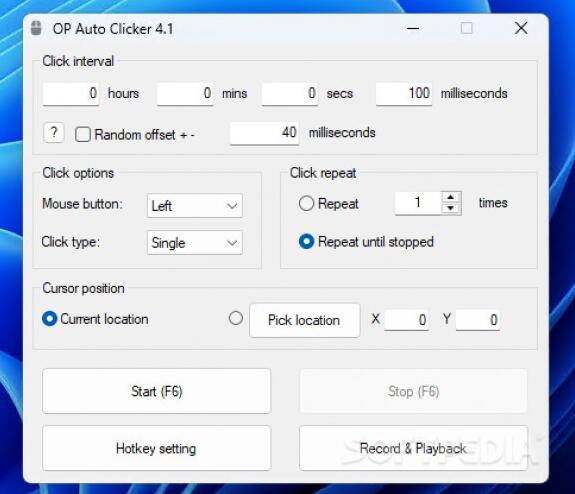
An open-source auto-clicker for Windows, written in C#, that’s all about simplicity and brute force: set the click interval, choose the mouse button, press a hotkey, and it starts clicking like crazy. Whether it’s for AFK farming in Roblox, grinding materials in Minecraft, or any tedious repetitive clicking tasks, it can handle it for you. The project is open-sourced under the MIT license, with all code public, so no need to worry about any hidden shenanigans.
GitHub Address: https://github.com/jiaoyanming0-bot/OPAutoClicker
Project Features
- Flexible Clicking: Switch between left, right, and middle mouse buttons freely. Set single, double, or even triple clicks.
- Precise Intervals: Intervals are accurate to the millisecond. Set it as fast as you want, or slow it down to seconds.
- Two Modes: “Infinite clicking until you stop it” or “set a fixed number of clicks to auto-stop.”
- Two Positioning Modes:
- Follow Cursor: Clicks wherever the mouse is pointing, following in real-time.
- Lock Coordinates: Pre-select a location, and it clicks there silently in the background, allowing you to do other things.
- Convenient Hotkey Control: Customize start/pause hotkeys. Control it without switching windows.
- Recording/Playback: Record a series of clicks as a macro and play it back later.
- Game Scenario Optimizations: Typical uses include Roblox AFK and Minecraft auto-farming/mining. The author suggests enabling random delay to avoid detection by anti-cheat systems due to overly regular clicking patterns.
- Other Practical Details: Portable software, just unzip and run, no installation needed. Small in size, can be carried on a USB drive.
How to Use
- Download and Run (Recommended):
- Go to the project’s Releases page and download
OPClicker.zip. - Extract the
.exefile. - Double-click to run. A window will pop up for you to set your hotkeys and click parameters.
- Press the hotkey to start, press it again to pause.
- Go to the project’s Releases page and download
- Compile Yourself (If you don’t trust pre-compiled versions):
git clonethe repository to your local machine.- Open the
.slnsolution file with Visual Studio. - Click “Build” to compile. The output is your own clean version.