
32steps: The Tool That Turns Android Volume Keys from “15 Gears” to “1000 Gears,” Packed with Scientific Tuning Data for Over 6,000 Headphones
32steps is a tool that upgrades your Android volume keys from a “15-speed clunker” to a “1000-step precision instrument.” It comes pre-loaded with scientific tuning data for over 6,000 headphones. No root required, no internet needed, no ads—just install and use.
GitHub: https://github.com/nulldio/32steps
What does it do?
- Volume granularity to an absurd degree Android systems default to 15–25 volume steps. At night, music is either too loud or too quiet. 32steps subdivides each system step, creating up to 1000 levels. Each press of the volume key moves the needle just a tiny bit. No more fumbling in bed for that “just loud enough not to blast my ears” sweet spot.
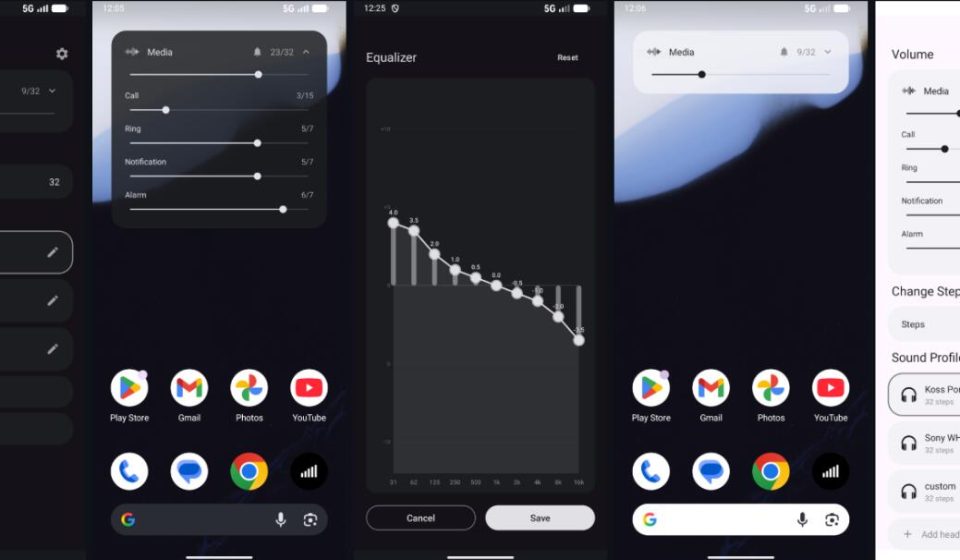
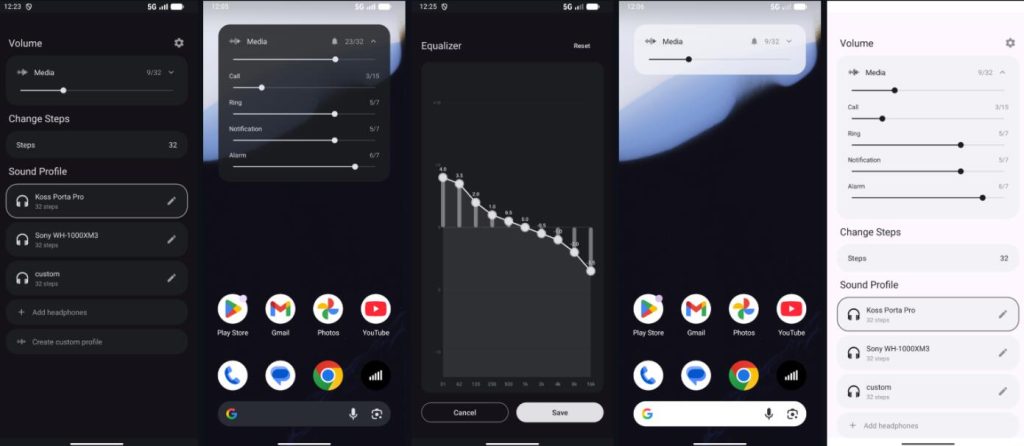
- Turn any headphone into the “correct” sound Built-in data for over 6,000 headphones from the AutoEQ database—from budget earbuds to flagship headphones. Select your model, and it automatically applies a curve that corrects the manufacturer’s tuning back to the Harman Target Curve. Don’t like it? Use the 10-band equalizer to fine-tune further, then save it as a preset.
- Better floating window than the system’s Pressing the volume key brings up a smart floating window instead of the system’s basic bar. Media, Call, Ringtone, Notification, and Alarm volumes are displayed as five parallel tracks. You can even adjust the left/right channels separately—a lifesaver if your hearing is uneven. You can also switch between Ring/Vibrate/Silent with a tap, no need to dig through three layers of settings.
- Convenient preset system Office noise-cancelling cans, commute earbuds, home speakers—save different step counts and EQ for each device. Switch presets with one click when you change gear; no re-tuning required.
- Works on Android TV too (Due to platform limits, you can’t change the volume steps on TV, but the 6,000-headphone tuning and Graphic EQ work perfectly. Navigate using the remote’s D-pad.)
Before you start:
- System Requirements: Android 8.0+
- Android 13+ Setup: Go to
Settings > Apps > 32steps > Top-right menu (three dots) > Allow restricted settings. Otherwise, the Accessibility Service won’t start. - First Launch: Follow the guide to grant permissions: Accessibility (to intercept volume keys), Display over other apps (for the floating window), and Battery Optimization exemption (to prevent background killing).
How does it work technically?
- No root? How does it change system volume? It uses Android’s
DynamicsProcessingAPI to layer gain offsets withineach system volume step to “fake” finer steps. On older devices without this API, it falls back to the traditional Equalizer method. - Volume key interception: Uses an Accessibility Service, kept alive by a foreground service, so it works globally, not just inside a specific player.